

How it works
Your Blackbaud data, in every pocket
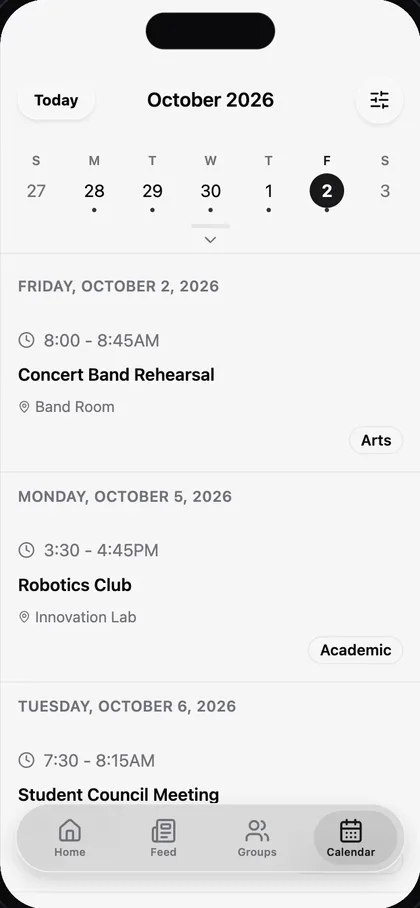
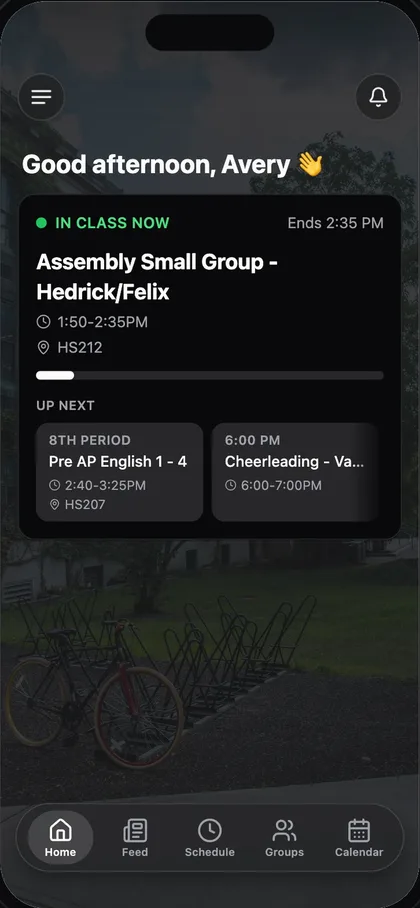
School Journey connects to the Blackbaud system you already run and turns it into an app families actually open. Schedules, assignments, calendars, and school news come across on their own, so nobody re-types them.


The connection
Plugs straight into Blackbaud
School Journey connects directly to your Blackbaud environment through the secure SKY API. Schedules, assignments, grades, and calendars flow into the app automatically, so nobody re-enters them. And for anything that doesn't live in Blackbaud, like a notice that needs to stay on the home screen, your team can publish it straight from the School Journey dashboard.
- A direct, secure connection to your Blackbaud environment
- No duplicate data entry: Blackbaud stays your source of truth
- Families and staff log in with their Blackbaud ID
- Home screen messages you publish yourself, pinned for as long as you need them
Always current
What comes across from Blackbaud
Everything families look for, pulled from the system your school already trusts.
Directories
Contact info, photos, and roles
Calendars
School events and activities
Schedules
Class times, rooms, and teachers
Assignments
Homework, due dates, and descriptions
Groups
Classes, teams, clubs, and custom lists
News
News and announcements you publish in Blackbaud
Resource Board
Links, files, and documents from your resource boards, matched to each person’s role
Grades
Class grades and graded assignments, where your school shares them
Athletics
Teams, game schedules, and rosters (pilot)
Updated through the day
Schedules, assignments, and calendars refresh from Blackbaud automatically.
Quick to load
The home screen and schedules open quickly, then refresh in the background.
Blackbaud is the source of truth
Change a schedule or calendar event in Blackbaud and the app follows. Nobody re-enters school data in School Journey.
Your school, your app
Make it unmistakably yours
With the branded app add-on, families download an app with your school's name on it.
Your colors and logo
Your school’s name on the home screen, not ours.
In the app stores
Families find it on the App Store and Google Play.
Your welcome screens
Your photos and words greet families the first time they open the app.
From kickoff to launch
What launch looks like
A clear path from connecting Blackbaud to families opening the app, with our team alongside you.
- 1Day one
Connect Blackbaud
A Blackbaud administrator installs School Journey from the Blackbaud Marketplace and authorizes the connection. We set up your trial from there.
- 2First 30 days
Try it with your own data
We start with a demo on your own data. Then your free trial uses your real schedules, assignments, and news, so your team can judge the real thing.
- 3After you sign
Make it yours
Choose your colors, logo, welcome messages, and features. For a branded app, we prepare and submit it to Apple and Google.
- 4Launch day
Welcome families
Families download the app and log in with their Blackbaud ID. A branded app takes six weeks or more to get here, and the School Journey app can be ready much sooner.
What your school does
- Authorize the Blackbaud connection
- Pick your branding, welcome messages, and features
- For a branded app, keep an Apple Developer account in your school’s name
- Tell families, using our launch pack
What we do
- Set up the Blackbaud integration and configure your app
- Prepare and submit your app store builds
- Train your admins (up to two hours, part of onboarding)
- Help you plan the rollout, including families who haven’t activated a Blackbaud account yet
- Support you Monday to Friday, 8 a.m. to 6 p.m. Eastern
Your launch pack
Made in your school’s colors, ready to share with families:
- A printable “how to get the app” guide with App Store and Google Play QR codes
- Social posts and a website banner
- An email signature banner for staff
- A ready-to-send email to families
Your data and your community
Safe by design, in writing
Our promises about your school’s data are written into our Master Services Agreement, not just on this page.
Your school owns its data
Ownership never transfers to us, and you control export, correction, and deletion.
FERPA and COPPA
We act as a school official under FERPA, and use under-13 data only to provide the service, with your school’s consent.
Never sold, never for ads
We never sell, rent, or trade school data, or use it for ads. We don’t train AI models on it without your written permission.
Help with records requests
When a family asks to see, correct, or delete their data, we help you respond at no charge.
Encrypted and access-controlled
Data is encrypted in transit and at rest, and only authorized staff can reach it.
Told within 48 hours
If a notifiable security incident affects your data, we tell you within 48 hours of confirming it.
You know who processes it
Our subprocessor list is available on request, with 30 days’ notice before a new one touches student data.
Easy to leave
Free export in common formats for 45 days after you leave, then deletion within 30 days.
Safety and controls
Your school decides how people connect. School Journey is for everyday school communication; keep your emergency alert system for emergencies.
- Your school sets who can message whom
- Parent chat can be limited to class families
- Anyone can report a message or block a person
- A community policy every user agrees to
- Grades and attendance switch on by audience
- Chat records are kept while an account is active, and for six months after
Read the full terms in our Master Services Agreement, including the Data Processing Addendum.
See it connected
Watch your Blackbaud data
show up in the app
We walk your team through it on your own school’s data, then your 30-day free trial runs on the same connection.